Not every defect needs fixing straight away. A hairline crack in a path, a bit of rot starting on a bench, a fence post beginning to lean — none of these need a repair today, but you don't want to forget about them either, because they will get worse. This article covers how to keep a defect under review in Civic.ly so that checking it actually happens.
Two halves, and you want both
Monitoring a defect properly takes two things, and they do different jobs.
The Monitoring status makes the defect readable. Anyone scanning your defects list can see at a glance that this one is open and deliberately under review, rather than open and waiting on a repair. That distinction matters when you are reporting, or when somebody else picks up your list.
A scheduled job makes the checking happen, and builds the history. A status is only a label: nothing in Civic.ly will bring a labelled defect back to you or put it on anybody's list. Set the status and nothing else, and six months later you have a set of defects you believe are being watched, with no evidence anyone has looked at them.
A job lands in someone's task list on the day it is due, and each completed job carries its own photo. That is the part worth understanding: a run of completed monitoring jobs is a dated record of how the problem changed. Photograph the crack in the pavement at each visit and you can see whether it has moved, rather than relying on somebody's memory of how it looked in the spring. That evidence is what tells you when watching has to turn into fixing, and it is what you produce if the asset is ever the subject of a claim.
So: set the status and schedule the job.
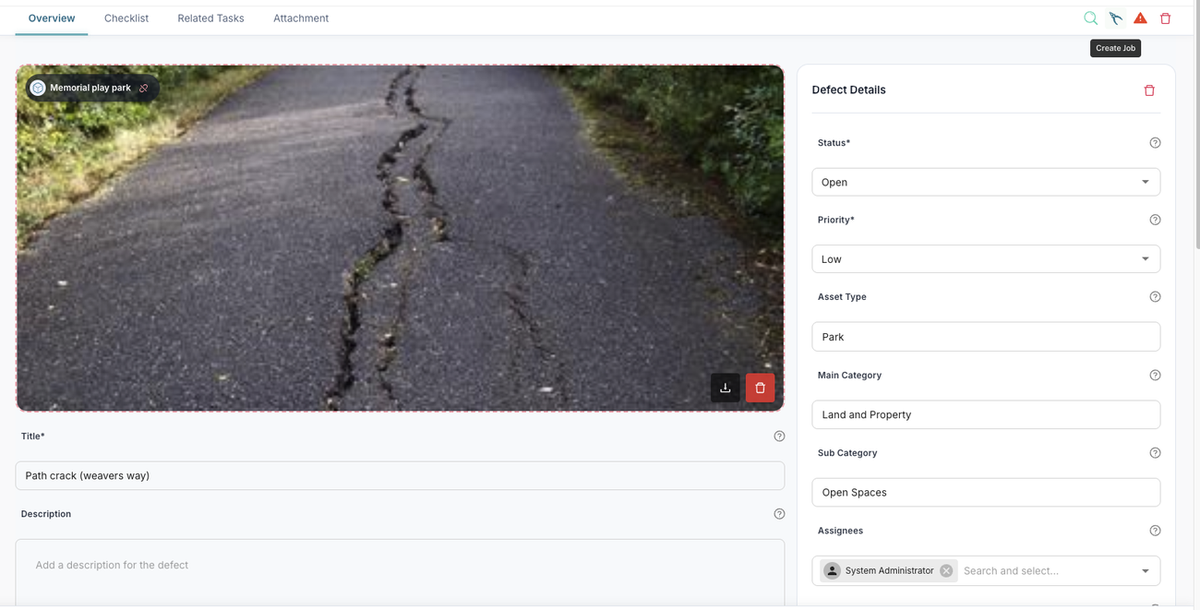
Set up monitoring on a defect
- Open the defect in the web app.
- Set its Status to Monitoring and its Priority to Low. The status records that it is deliberately under review; the low priority keeps it out of the way of the urgent work.
- Use Create Job (the leaves/shears icon on the record header).
- Edit the title so it's obvious what the job is for — "monitor crack, check if spreading" rather than just the asset name.
- In the Job Details panel:
- Set a Due Date for the first check.
- Add a Recurrence if you want it to repeat. Keep the frequency low: quarterly, twice a year or annually suits most of these. A slow-moving problem checked monthly just generates jobs nobody learns anything from.
- Choose the Assignees who'll do the checking.
- Click Create Job.
That's it. The check now arrives on its own, and because the job is linked to the defect, everything stays together on the asset's Tasks tab.
Both a one-off and a recurring job are worth having, and they answer different questions. A single job dated a few months out suits "go and look, then decide" — you expect to make a call either way at that point. A recurring job suits something you'll be living with for a while, and it's the one that builds up the picture of whether the problem is actually deteriorating.
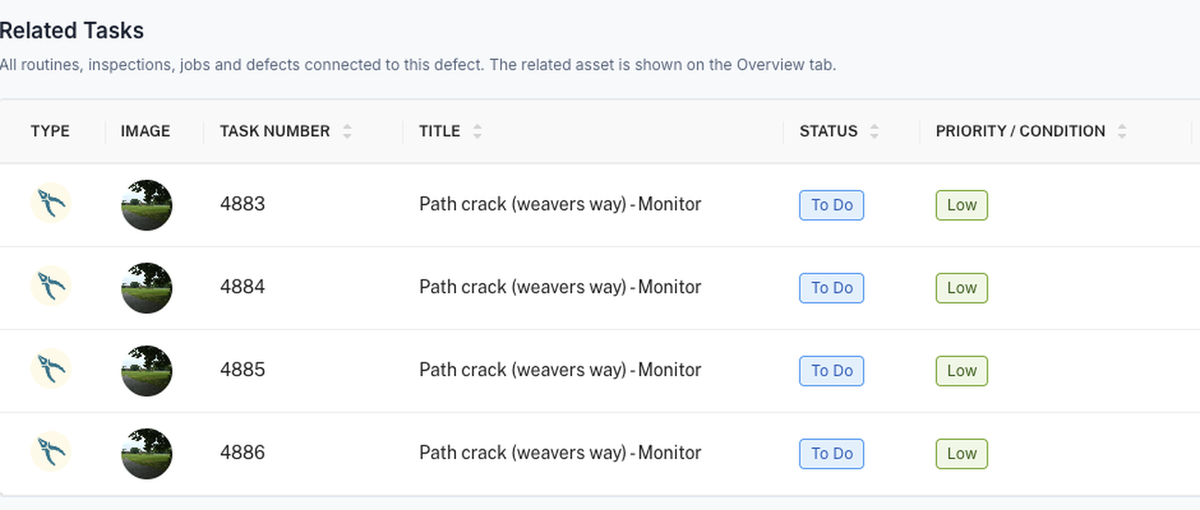
Don't close the defect
It's tempting to close the defect and let the monitoring job carry it. Don't. Closed means resolved, and a known problem recorded as resolved is a gap in your records — exactly the sort of gap that matters if the asset is ever the subject of a complaint, a claim or an insurance question.
Leaving it on Monitoring at Low priority costs you nothing (you can filter it out of your working list) and keeps the record straight: the problem exists, you know about it, and here is the evidence you have been keeping an eye on it.
The exception is a fault you are recording once and genuinely never revisiting — existing bodywork damage on a vehicle you have photographed for the file, or an item a machine was never supplied with in the first place. Nothing is being monitored there, so Closed is the right status, and putting it on Monitoring only pads the list with something nobody will revisit. The test is whether anyone is going back to look. If they are, this article applies; if they are not, see What do I do with repeated defects and faults we have decided not to fix?.
- Take the photo from the same spot each time. A run of photos from the same angle shows movement far better than a set taken from wherever the inspector happened to stand.
- Say what "worse" looks like in the job description — "check whether the crack has reached the drain cover". It gives whoever attends a clear decision to make rather than a judgement call.
- When it does need fixing, raise a separate job for the repair and let the monitoring job stop. See Fixing defects with jobs.
Common Questions
Yes. Set it on the defect so your list shows at a glance which problems are under review. Do still schedule the job alongside it: the status records your intention, the job is what actually brings the check back to someone.
No. Nothing in Civic.ly chases a status. Without a job with a due date on it, a Monitoring defect sits there indefinitely and nobody is prompted to go and look.
Set them to Low priority and filter your list by priority when you're working through the urgent items. That keeps them out of your way without recording them as fixed.
Yes. Create a job against the asset directly, with a recurrence, and describe what to look at. You don't need a defect first — though if there's a genuine fault, logging it as a defect gives you the better record.
Set the recurring job to Cancelled (or let the last one complete and don't repeat it), raise a job for the repair itself, and once that's done set the defect to Fixed or Closed. The full history stays on the asset's Tasks tab.
Something not working?
If a recurring job isn't appearing when you expect it, see Scheduling recurring tasks.