A wide-ranging month. The mobile app leads the way with a faster, more focused task list and full keyword search. The web app gains one of your most-requested features, adding assets to an existing routine, along with one-click Quick Filters on the asset list. And there is a large batch of new inspection checklists covering building compliance, electric vehicles, grounds machinery, property condition and open space sweeps. Everything below is live now.
Mobile app
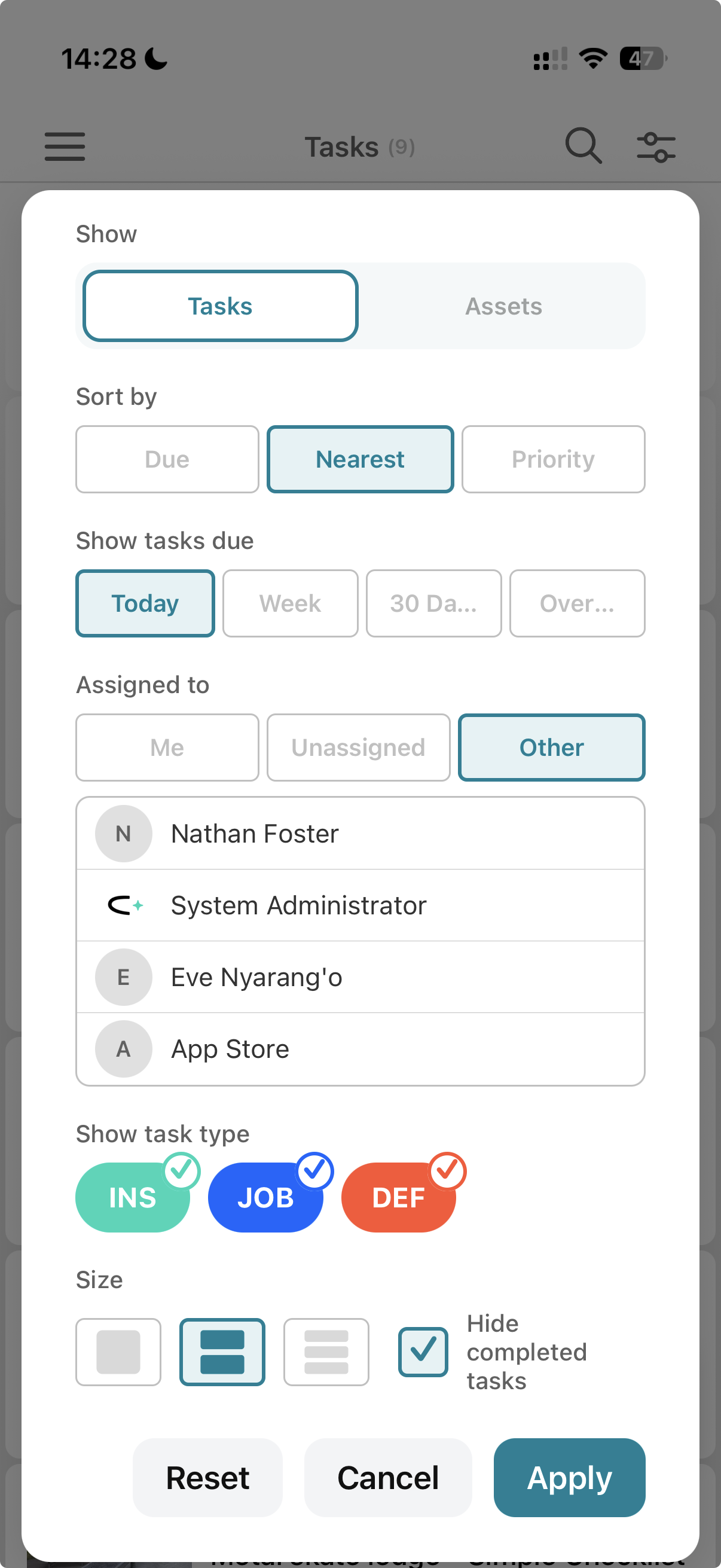
A faster, more focused task list. We have reworked how the task list loads and filters. Previously the filters could pull back thousands of tasks at once, which slowed the app down and buried the work that actually mattered to you. The list now loads a bounded, relevant set:
- Show tasks due replaces the old "All" option with bounded windows: Today, This week (the new default), Next 30 days, and Overdue (tasks due before today that are not yet complete).
- Assignee filter defaults to you, so you open the app straight to your own work. Supervisors and admins can switch to another user, or to unassigned tasks; everyone else sees their own tasks only.
We made these changes to improve the app's performance and to give each user more relevant results.
Search your tasks and assets. You can now keyword-search the task and asset lists: tasks by title, and assets by name, type and sub-category. Search also works on the asset picker you use when adding an asset to a task, and you can search assets by location tag.
Set a task's location on the map. You can now set or change a task's location directly in the mobile app, using the map, rather than relying on the linked asset's location.
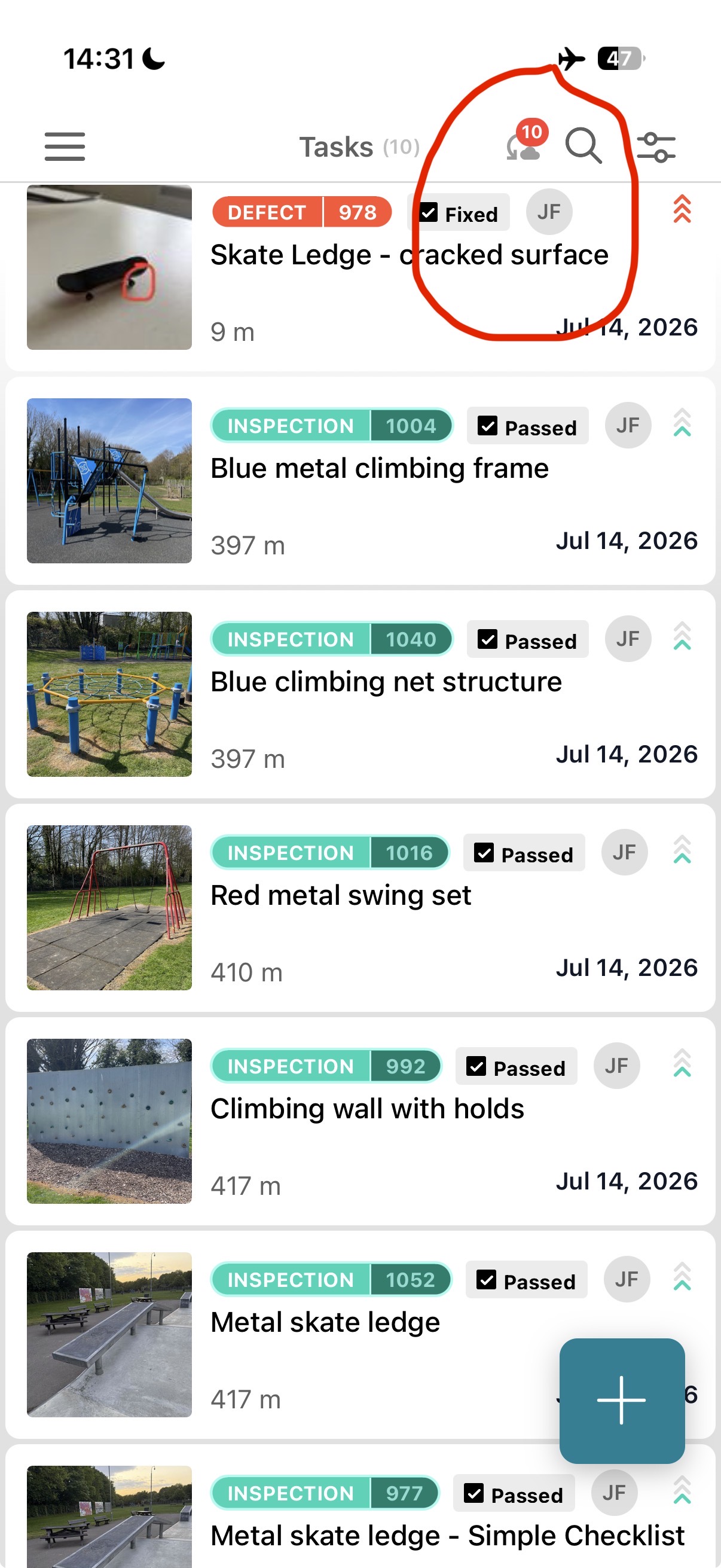
Work offline. You can now create a job or inspection and complete it with no signal, not just carry on with tasks already on your device. The home screen shows how many of your changes are still waiting to sync, counting down as they upload, so you can see your work is captured before it reaches the office. Tap the indicator to open the queue. Everything syncs automatically when you are back in range.
Checklists on jobs. Job checklists no longer show the Defect button, because defects belong to inspections rather than maintenance jobs, and you can filter the checklist picker by asset type and task type.
Everyday improvements. The app version now shows on the login screen. The forgotten-password screen guides you on password strength the same way sign-up does. Completing a task now takes a deliberate full swipe, so items are not completed by accident while you scroll. A defect you raise now appears in your list straight away. We also fixed empty task and asset lists straight after an app update, slow or missing images on large cards, and a glitch when picking an asset.
Web app
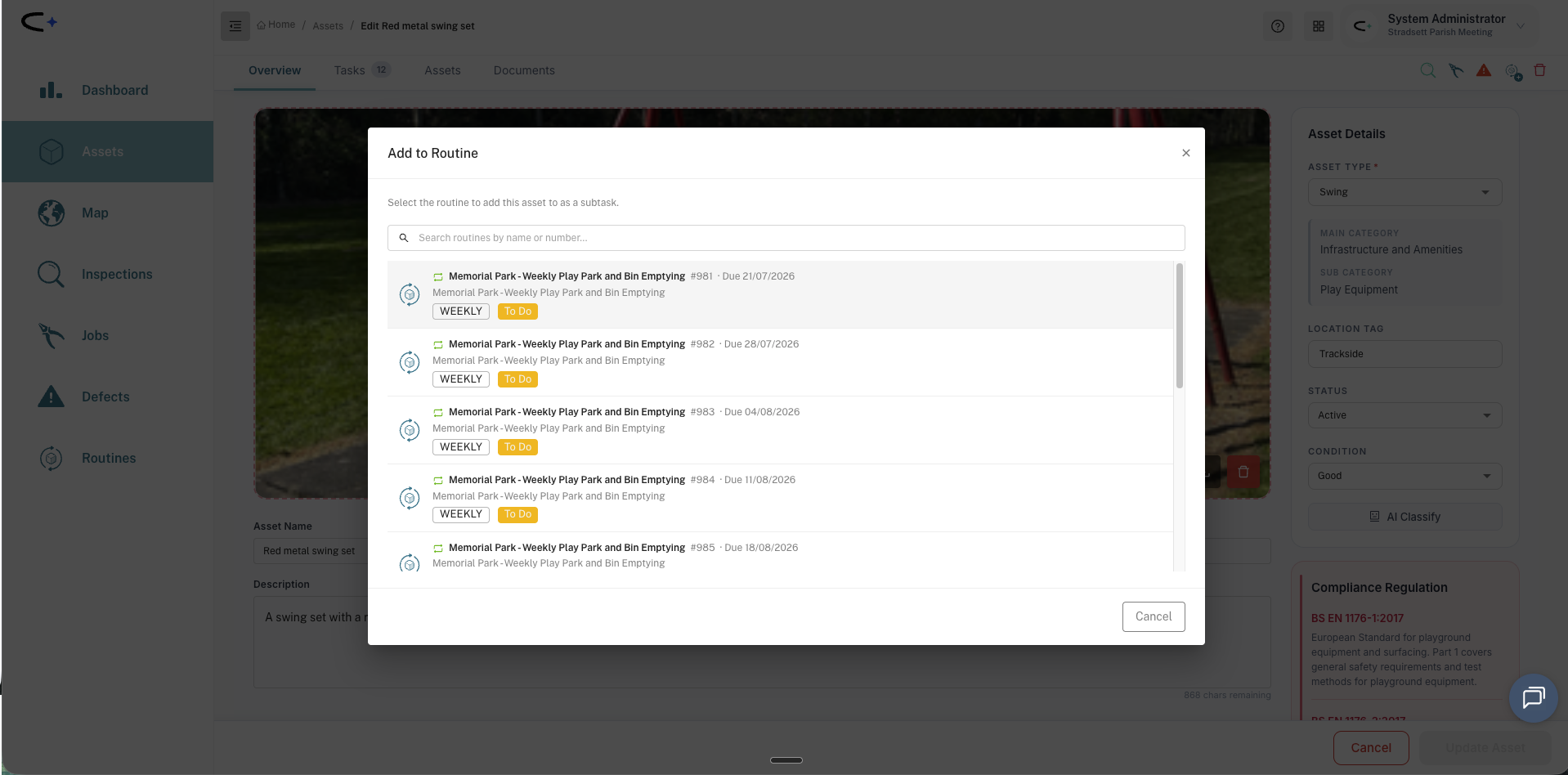
Add asset to existing routine. One of your most-requested features. You can now select assets on the asset list and add them to an existing routine (or a brand-new one) in one step, instead of rebuilding the routine from scratch. Routines can no longer be created without at least one task.
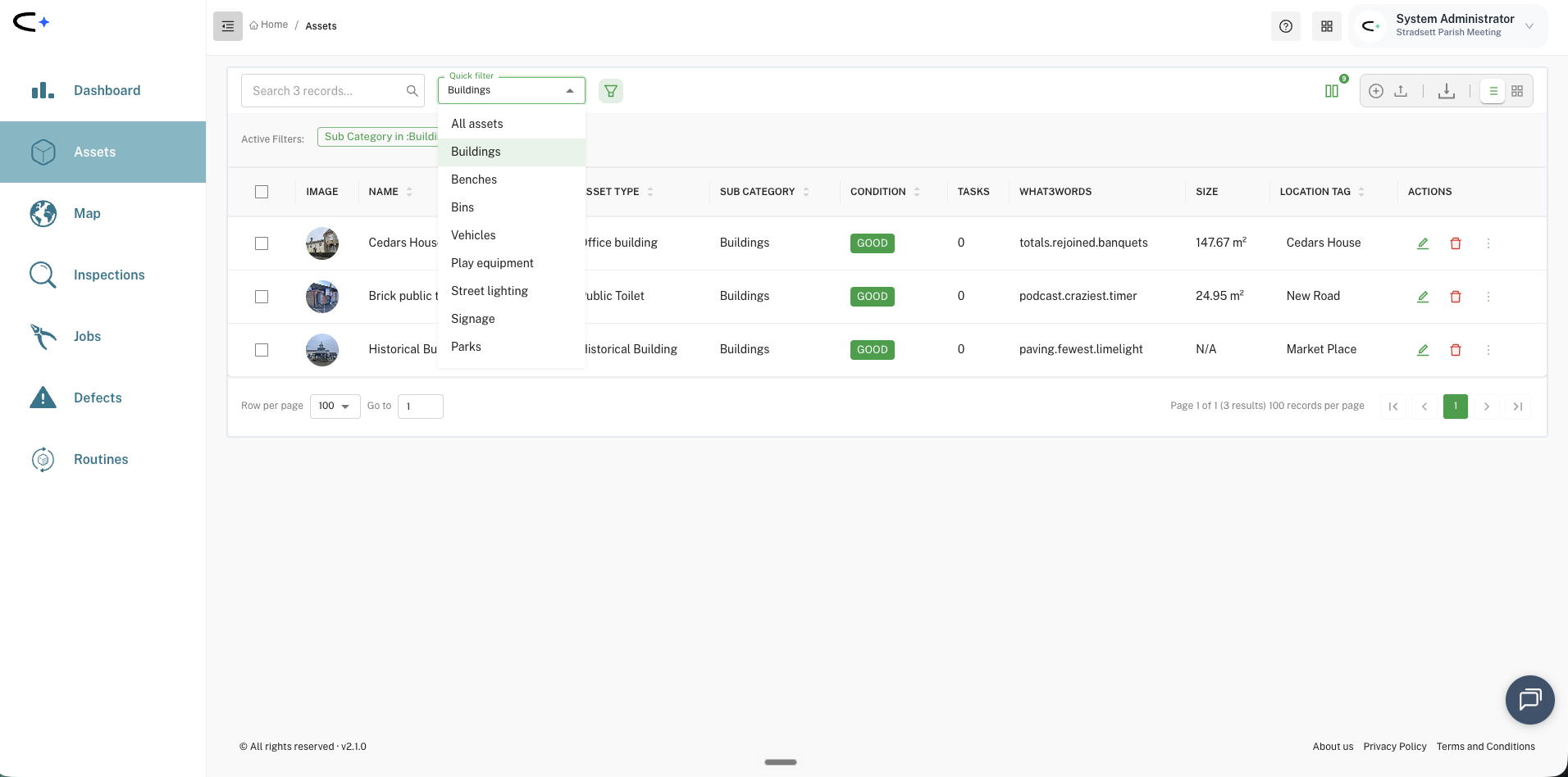
Quick Filters on the asset list. A new Quick Filter dropdown gives you pre-built groups (benches, bins, buildings, playground equipment, parks and open spaces, and more) so you can narrow the list to your most common groups in one click, without building an advanced filter. The list toolbar has been tidied to match: its controls are renamed for consistency (the task filter is now "Quick Filter" and the task template is now "Checklist Filter"), and bulk image upload is back on the asset toolbar.
Create tasks straight from the task lists. A plus button on the Inspections, Jobs and Defects lists lets you create a task there and then: pick an asset, or create a general issue with no asset at all, complete with its own photo and map location.
Task locations. You can set or change a task's location from the task details screen using the same point, line and polygon tools as an asset record. When you move an asset, we now ask whether to update the location of its future tasks too.
Mapping. Areas no longer receive an automatic location tag. This fixes an annoying issue where an area could inherit the location tag of another area it sat within. An area's location tag is now set explicitly by you, and it is required when you create the asset.
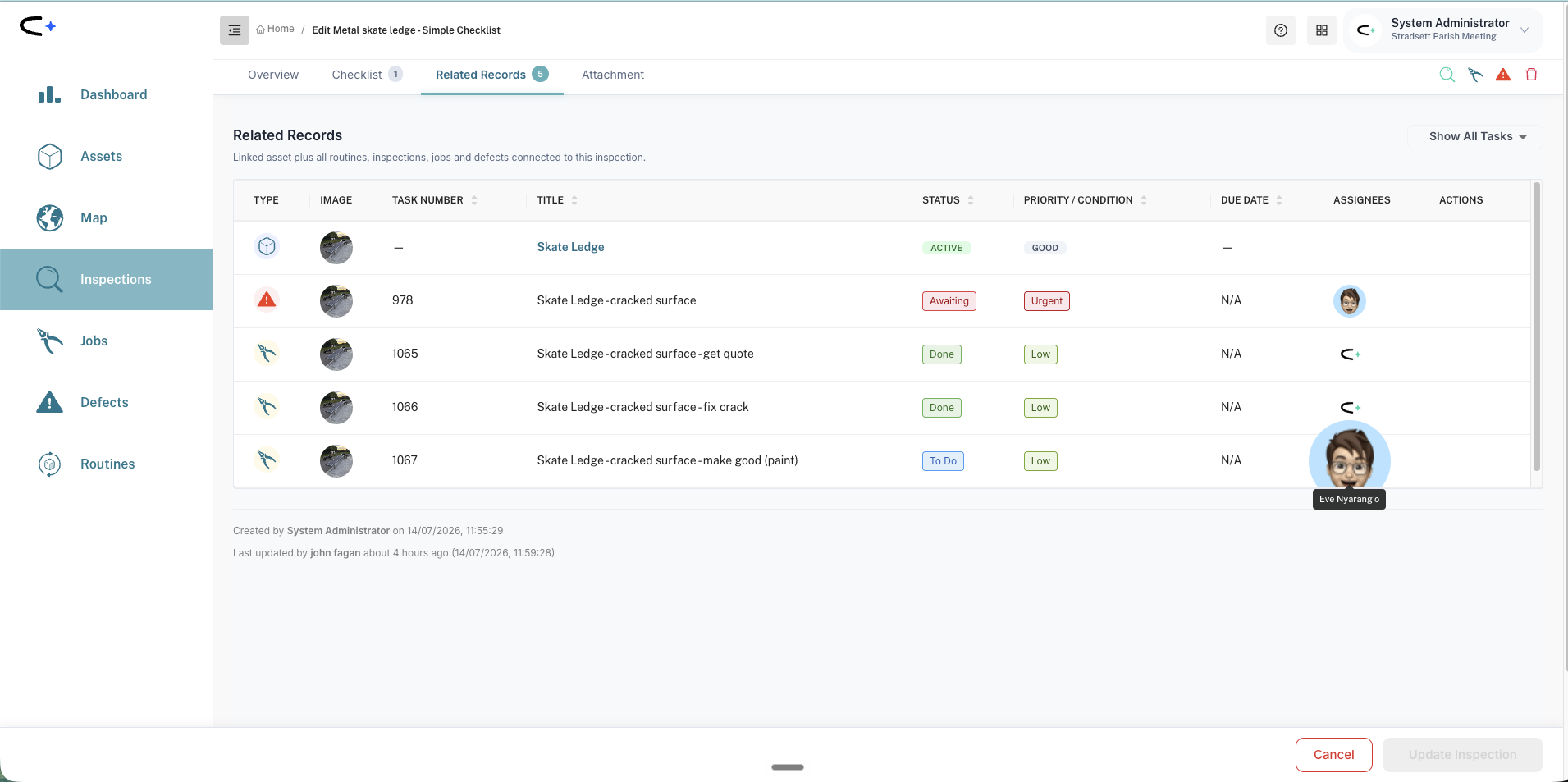
Related records. Related Records now defaults to showing all records rather than hiding completed ones. We have also improved how records link together. If an inspection fails and you raise a defect for that specific checklist failure, then create one or more jobs to fix the defect, all of those tasks are now linked. Open any one of them, the inspection, the defect or a job, and its Related Records shows all the others.
Smaller touches. New tasks pre-fill their title from the asset name rather than the asset type. Creating a task from another task keeps that task's own image rather than reverting to the asset image, and a job created from a defect keeps the defect's image.
Building compliance checklists are here
New to checklists? How to use a checklist explains the OK / N/A / fault responses and the pre-filled defect a fault offers, and the Checklist Index shows which checklist applies to each asset type.
The HVAC and building compliance checklists we promised in June are live: routine duty-holder checks for the building services equipment added to the catalogue recently, each linked to the relevant UK standard.
- Fire suppression: fire hose reels, sprinkler systems, dry and wet risers, fire hydrants.
- Gas, heating and lightning: gas meters, radiators, flues, lightning protection.
- HVAC: air handling units, ventilation systems and the rest of the HVAC family.
Like the rest of building safety, they use colour-coded responses, and a fault offers the matching defect, pre-titled, for you to raise. They sit alongside the Simple Checklist these types already had. See Building Services & Plant Checklists and Fire & Emergency Safety Checklists for the full detail.
Electrical checklists
A full set of electrical inspection sweeps is now live, covering the fixed electrical infrastructure a council looks after. Each one is a detailed walk-round: you record every item as OK, N/A or fault, and finish with a graded overall-condition question that updates the asset record. Each sweep is linked to the relevant UK standard (the Electricity at Work Regulations 1989, BS 7671 wiring regulations, and the lighting and charging standards that apply), so the check doubles as your duty-holder record.
- Street Light Sweep (monthly), covering street lights, LED, decorative and smart lights, and flood lights.
- EV Charging Point Sweep (weekly), for charging points and buggy charging stations. This checks the charging unit itself, and is separate from the electric vehicle checklists above.
- Electrical Cabinet Sweep and Distribution Board Sweep (monthly).
- Fixed Electrical Installation Sweep (monthly), with a check that the EICR certificate is in date folded in.
- RCD Sweep (monthly), built around the trip-test button.
These cover fixed installations only. Portable appliance testing (PAT) is not part of this release. Like the other sweeps, they use the per-item OK / N/A / fault format and a failure offers the matching defect, pre-titled, for you to raise. Full detail is in Electrical Checklists (Fixed Infrastructure).
Vehicle checklists: electric variants and a tidy-up
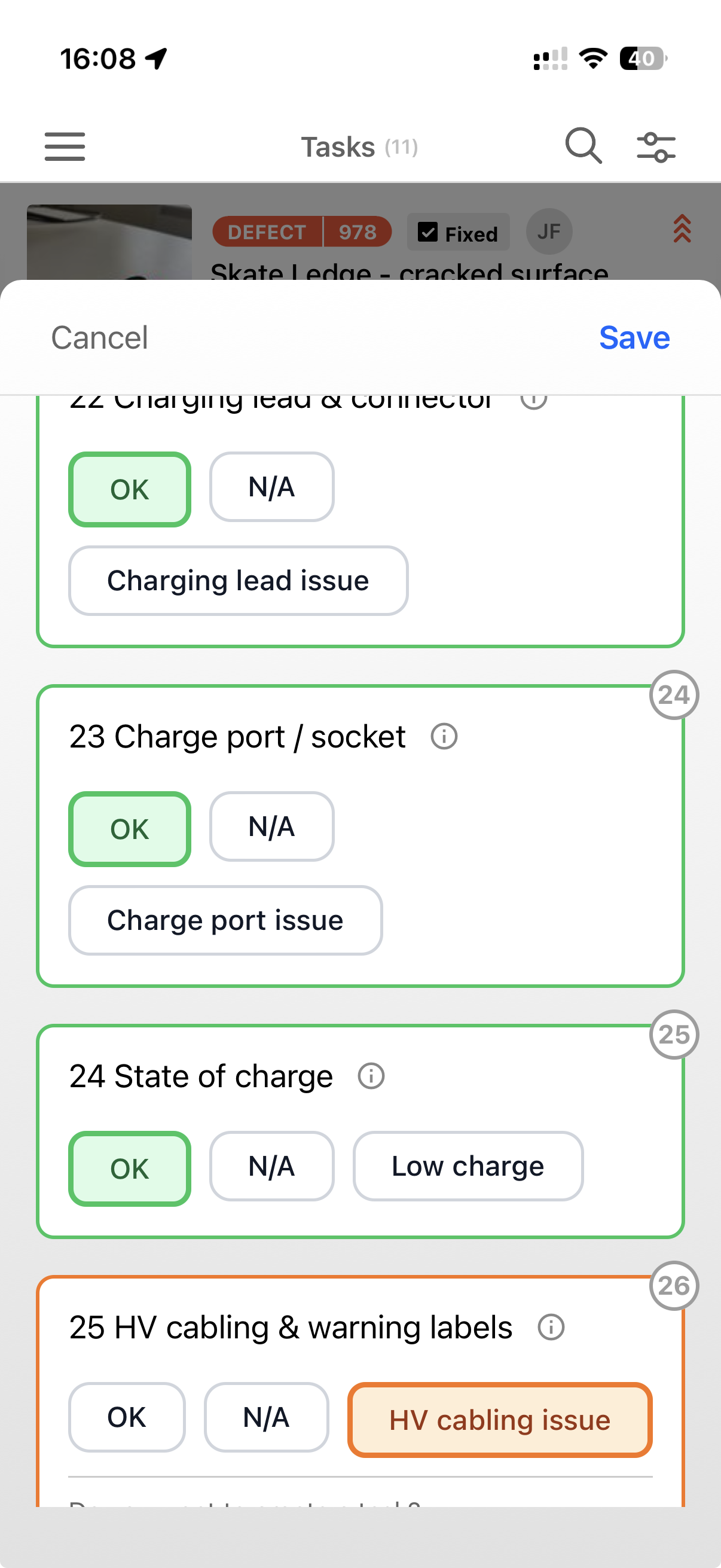
- Electric and diesel/petrol versions. Every powered vehicle's Check and Sweep now comes in both, so crews pick the one that matches the vehicle. The electric version drops the oil, fuel and air-filter items and adds charging lead, charge port, state of charge and HV cabling.
- Roll-bar check added to the plant and mower Check.
- Clearer names. "Routine" has been dropped from everyday Check names (so Van Check, not Routine Van Check). In-progress inspections are unaffected.
- Old checklists retired. Vehicle Pre-Use and Operational Inspection are gone from the dropdown, and Vehicle Annual Compliance is renamed Annual Road-Legal Check (same checklist, clearer name).
See Vehicle Checklists for the full line-up.
Grounds and powered equipment checklists
New checklists for the powered hand and walk-behind machinery your grounds teams use every day, built on the same model as the vehicle checks. Each type gets a quick graded Check and a detailed per-item Sweep (record every item as OK, N/A or fault, finishing with a graded overall-condition question that updates the asset record), and both come in petrol and electric versions where the machine can be either, so crews pick the one that matches the kit in their hands. Every checklist also records a running-time reading, to help you keep on top of hand-arm vibration (HAVS) and noise exposure. Each type is linked to the relevant UK standards (PUWER, the vibration and noise regulations, and the machine-specific BS EN standards).
- Mowers and turf machines: walk-behind lawn mowers, scarifiers, rotavators, soil aerators.
- Cutting tools: strimmers, brush cutters, clearing saws, hedge trimmers.
- Saws: chainsaws and pole saws, with bar, chain, tension and chain-brake checks.
- Blowers and other kit: leaf blowers and vacuums, mulchers and shredders, snow blowers.
Like the other new checklists, they use colour-coded responses, and a fault offers the matching defect, pre-titled, for you to raise. They sit alongside the Simple Checklist these types already had. See Grounds & Powered Equipment Checklists for the full set.
Property condition sweeps
New sweeps for the inside of your buildings: walk a property and record its condition in one pass. They use the per-item OK / N/A / fault format, with a graded overall-condition question that updates the asset record.
- General: Room Sweep and Building Sweep.
- Room-specific: Washroom, Kitchen, Office, Public Toilet, Sports Pavilion, Library and Entertainment Venue.
Full detail is in Room Sweeps and Building & Venue Sweeps.
Property sweeps: sharper toilet checks, and less repetition
Following your feedback on the property sweeps above, we have added two new sweeps and reworked the rest so they are shorter and less repetitive. As before, these are the routine duty-holder checks your own team makes, and sit alongside, not in place of, any statutory or contractor inspection.
New sweeps.
- Changing Room Sweep, for changing room assets, covering the fittings, showers and hygiene points a changing room needs on top of the general room checks.
- Beach Hut Sweep, a standalone check for beach huts, tuned to that structure. It is self-contained, so it is not paired with the general Building Sweep.
Slimmer, non-repeating sweeps. Previously each specialised sweep (Public Toilet, Washroom, Library, Sports Pavilion, Entertainment Venue, Kitchen, Office) repeated the whole building or room survey inside itself, which made them long. Now the shared fabric, services, security and safety checks live once on the general Building Sweep and Room Sweep, and each specialised sweep carries only its own fixtures. So a specialised building or room now shows two sweeps in the picker: the general sweep for the fabric, plus a much shorter focused sweep for that type's own kit. A public toilet, for example, offers the Building Sweep and a slimmer Public Toilet Sweep. Run the focused sweep on the frequent cadence and the general sweep less often, or run whichever the visit is for.
Better toilet checks. Prompted by a customer's own monthly toilet sheet, the Public Toilet Sweep and Washroom Sweep gained the items councils told us they were missing: the accessible WC emergency pull cord and alarm test, hot and cold water supply, secure storage of cleaning chemicals (COSHH), a sharps and hazardous-waste check, and a cleanliness check, so the frequent toilet check stands on its own.
See How to Use a Checklist for how the general and focused sweeps work together, and Room Sweeps and Building & Venue Sweeps for the full detail.
Open space sweeps: now covering pests and hazards
The June open space sweeps gained:
- Pest evidence on the Allotment, Cemetery, Park and Sports Ground sweeps.
- Invasive plants: spot-and-report for knotweed, giant hogweed and ragwort.
- Asbestos and hazardous materials: spot-and-report on the Allotment sweep.
Plus two new Allotment Plot checks.
See Open-Space Sweeps for the full set.
Water amenities
A new Bottle Filling Fountain Check that records the dispensed-bottle counter reading against the task, with a light condition check. See Water Bodies & Features Checklists for more.
More reliable recurring tasks
We have continued June's work on how recurring routines generate their tasks, and closed out a batch of scheduling issues so your routines create the right tasks, on the right dates, and stop when they should. Among them: monthly schedules now cope with months that have no 29th, 30th or 31st; "repeat every year" no longer creates tasks beyond the series end date; deleting a single instance of a routine no longer removes more than you intended; defects are no longer generated on a recurring schedule; and ending or unlinking the last task in a routine now correctly closes the routine. These mostly affected a small number of councils, and there is nothing you need to do.
Other fixes
We also fixed the asset list forgetting your advanced filter and sort when you return from an asset record, a routine's task template appearing empty until you switched task type and back, and tasks not always inheriting the correct related records.
In your hands
Everything above is live now. Keep the ideas coming at ideas.civic.ly, or email hello@civic.ly.
Common Questions
No. The web app updates when you refresh your browser, and the mobile app updates through the App Store or Google Play (you may be prompted to update).
Yes. You can create and complete jobs and inspections with no signal, and the home screen shows how many of your changes are still waiting to sync. Everything uploads automatically when you reconnect.