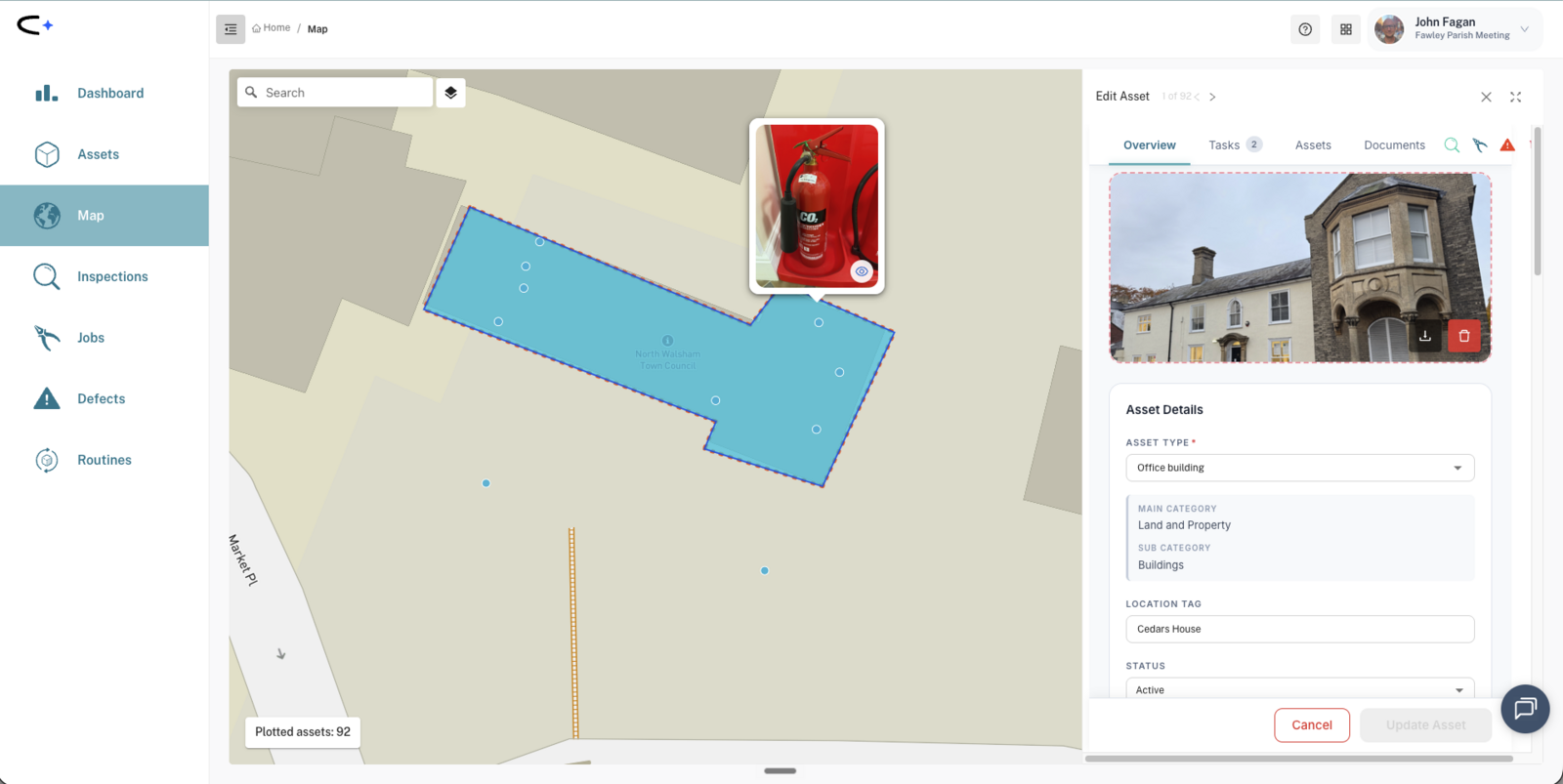
draw each building's footprint as an area on the map with a location tag, and capture each checkpoint as its own asset: every fire alarm call point, extinguisher, emergency light, and (for legionella temperature checks) each water outlet. Name each asset exactly as your existing paper log names it, because the asset's name becomes the task title the person in the field sees.
A town hall or pavilion carries a different inspection problem from a park: lots of small statutory checks on different frequencies. Weekly fire doors and alarm points; monthly extinguishers, emergency lighting and legionella temperature checks; monthly plant checks if you have HVAC or lifts; and multi-year items like the electrical installation report. The regime also has to satisfy an external audience: your fire risk assessor, your insurer, sometimes an auditor. This guide applies the options in Choosing How to Inspect to buildings, with the real checklists for each.
A whole building in one task: the Building Sweep or Room Sweep
One recurring inspection over the whole building or, if you track rooms as their own assets, over each room, using the Building Sweep or Room Sweep. This is a proper walk-round, not a vague "general condition" tick: one question per physical item, in walk-round order. Roof and external fabric, doors, windows, lighting, heating and ventilation, fire safety, security, cleanliness and more (60 items on the Building Sweep, 34 on the Room Sweep). Each item is answered OK / N/A / a named fault, and a single Overall Condition rating at the end updates the asset's own condition record. It is the closest match to a paper property-inspection form (room, fixture, condition, action), except the action becomes a trackable defect and job instead of a free-text note.
Seven spaces with their own kit get a tailored version as well, mapped automatically on the relevant asset type: Washroom, Kitchen, Office (and Meeting Room), Public Toilet, Sports Pavilion, Library, and Entertainment Venue Sweep. Each covers that space's own fixtures: cubicles and cisterns for a washroom, worktops and extraction for a kitchen, stage rigging for a venue.
Pros: quick to set up, since it is already in the checklist picker on the relevant asset types, and genuinely itemised.
Cons: the evidence is at building (or room) level. A defect started from a failing sweep item attaches to the building, not the extinguisher, unless you raise it on the extinguisher yourself from the mobile + button. And checkpoint-level history for a specific fire extinguisher or call point needs the next option: a building's task list does not roll up the tasks of the assets inside it, so a sweep on the building and checks on its contents sit side by side, not nested.
A checklist on each checkpoint, one routine per frequency
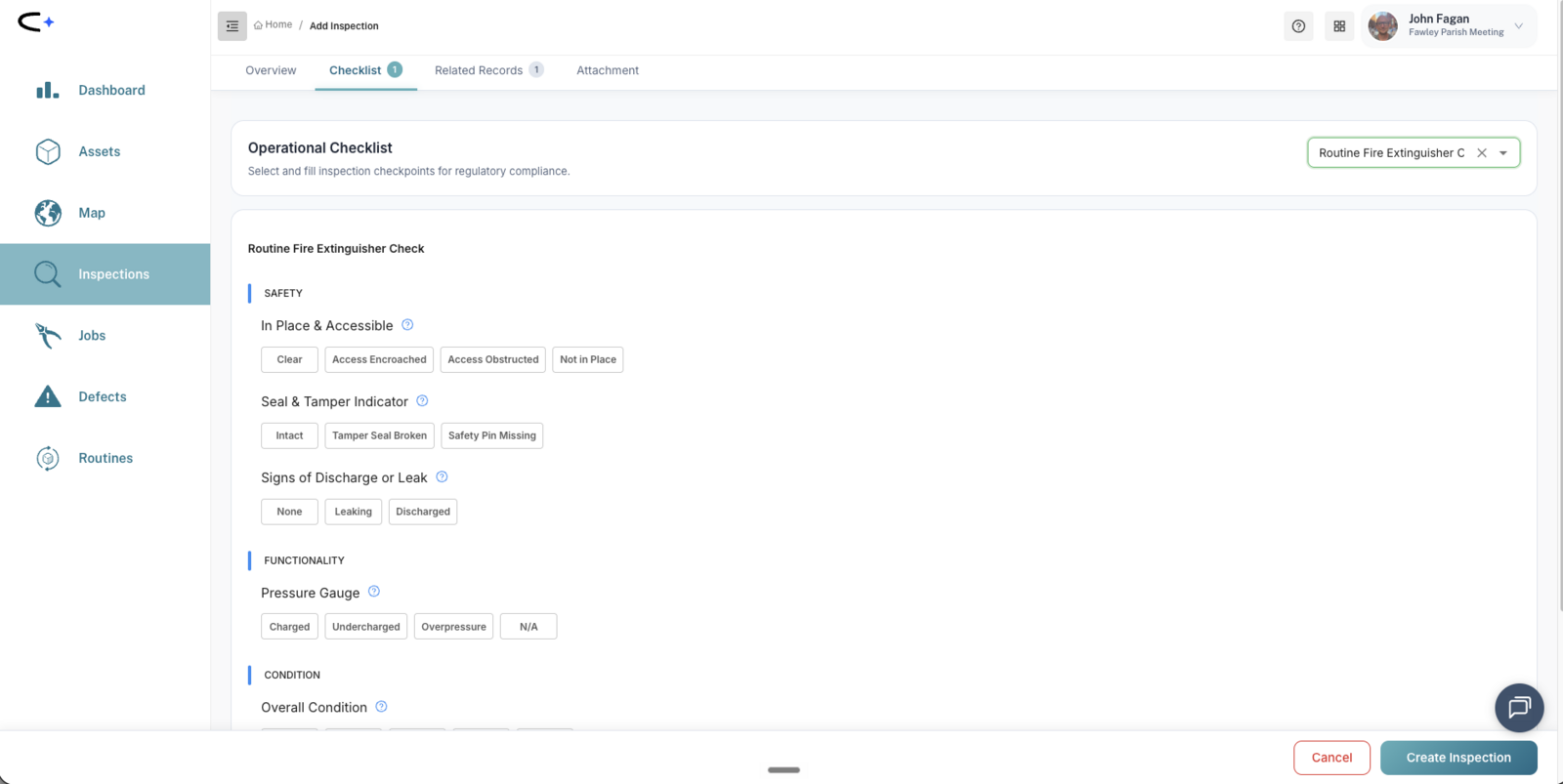
This is the shape that works for most councils once they are serious. Group the building's checkpoints into one routine per frequency, with the standard checklist on each checkpoint type: Fire Door Check, Fire Alarm Check, Fire Extinguisher Check, Emergency Light Check, CO Alarm Check, and Water Outlet Check for legionella temperature checks. Bigger buildings with hose reels, sprinklers, hydrants, risers or smoke vents get the same treatment; see the full Building Fire Safety Checklist. As a taste of the granularity, the extinguisher check asks six things:
Fire Extinguisher Check: In place & accessible · Seal & tamper indicator · Signs of discharge or leak · Pressure gauge · Physical damage · Overall condition.
A worked example, Brackenhill Town Council's community hall:
- "Community Hall weekly" routine: fire doors (Fire Door Check), alarm call points (Fire Alarm Check), water flush on the little-used outlets (Water Outlet Check). Ten minutes for the caretaker who is there anyway.
- "Community Hall monthly" routine: extinguishers, emergency lights, CO alarm, legionella temperatures on all outlets, plus the Water Meter Reading while they are at it.
Why per building rather than one big routine across all your buildings? Your fire risk assessor wants one building's records in one clean view, and access differs per building (different keyholders, different days).
Pros: checkpoint-level evidence, organised for exactly the people who will ask for it.
Cons: the setup is only as good as your asset capture. Each checkpoint has to exist as an asset first. Budget an hour per building with the mobile app.
Negative reporting for the quick weekly checks
A weekly fire-door walk can mean a dozen near-identical passes. Keep the checklist attached, and let the caretaker swipe right on the mobile app to pass each door in one gesture. Swipe left marks it failed and pops the checklist up, so a door that will not close still gets a full record of what failed. Swiping works on the medium card size, not the large cards. See Working in the Field.
If your building has plant or fixed electrics
Bigger or newer buildings often carry plant a simple hall does not: air handling units, chillers and ventilation, gas meters and radiators, a passenger lift or hoist, a lightning protection system. Capture each as its own asset inside the building area and add it to the right frequency routine (Air Handling Unit Check, Gas Meter Check, Lift Check, Annual Lightning Protection System Check, and so on). See the Building Services and Plant Checklist.
Fixed electrics have their own itemised visual sweeps: Distribution Board Sweep, Fixed Electrical Installation Sweep, RCD Sweep and Electrical Cabinet Sweep. They are the routine visual layer between contractor tests, not a replacement for the EICR. See Electrical Checklists.
On top: the external and multi-year layer
Whichever options you use for weekly and monthly checks, schedule the statutory and insurance items against the building as recurring inspections: the electrical installation condition report (EICR), fire risk assessment and its reviews, PAT testing, boiler and heating servicing, the annual Gas Safe check, LOLER thorough examination on any lift, periodic lightning protection testing, and certificate renewals. This is the planned preventative maintenance (PPM) layer, the checks that outlive whoever set them up. See Planned Preventative Maintenance (PPM) in Civic.ly.
Most are carried out by external contractors. The scheduled task is your prompt to book them, and the completed record (date, certificate photo, notes) is your evidence. Add each problem in the report as a defect or job on the asset it concerns.
Where the defect goes
When a checklist answer fails, the app offers to raise a defect and pre-fills the title with the asset and the fault (for example "Fire extinguisher - Discharged"). You choose whether to create it. Raise it on the specific checkpoint wherever you can, so its own history builds up. The work to fix it then goes in a job.
Producing evidence for an assessor or insurer
There is no compliance dashboard yet, so the operating model is: schedule everything, and treat overdue as your non-compliance signal. If a check is not in Civic.ly, nothing will tell you it is not happening. When someone needs proof:
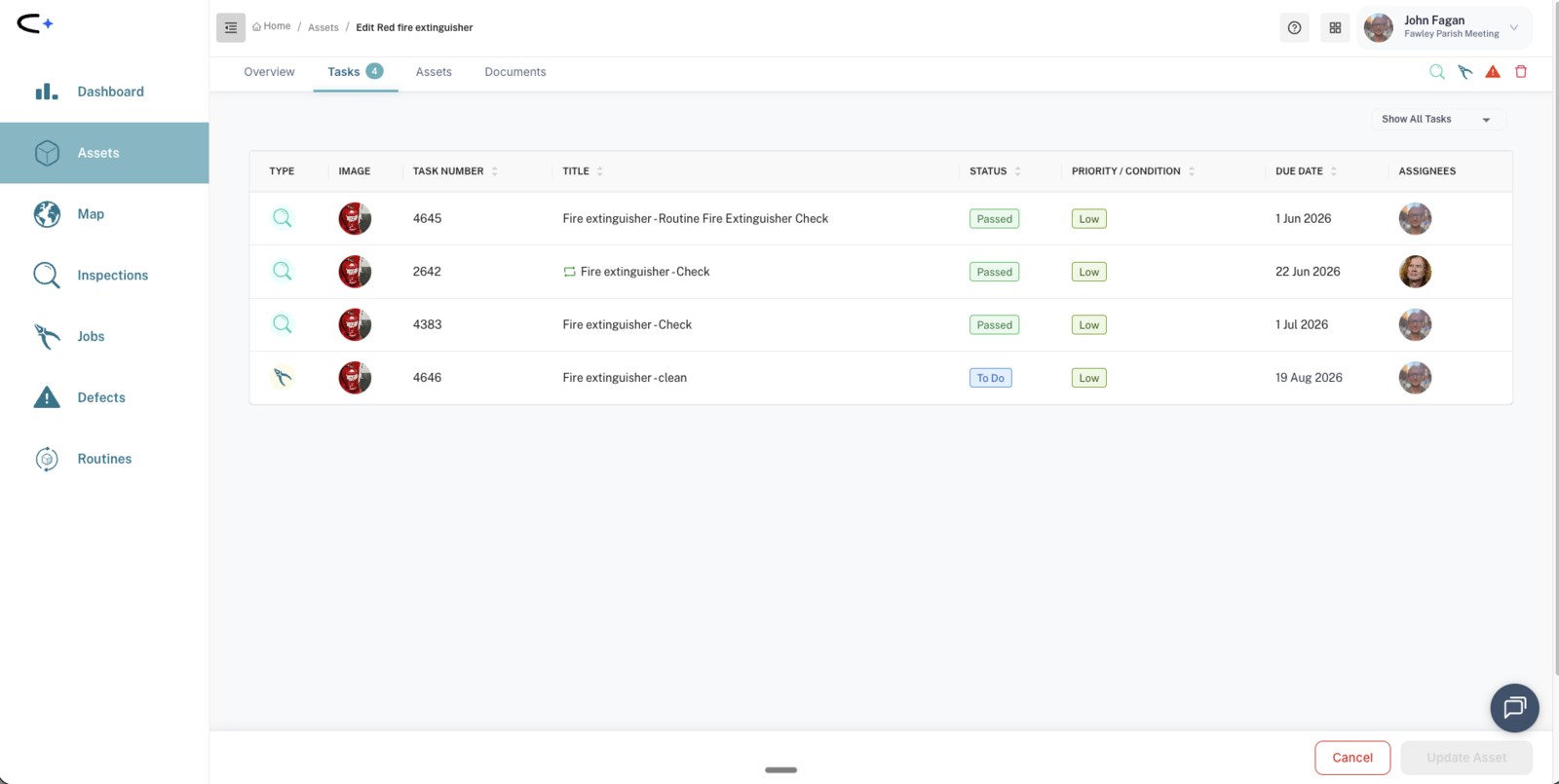
- An asset's Tasks tab is its audit view: every inspection, defect and job on that extinguisher or that building, dated and photographed.
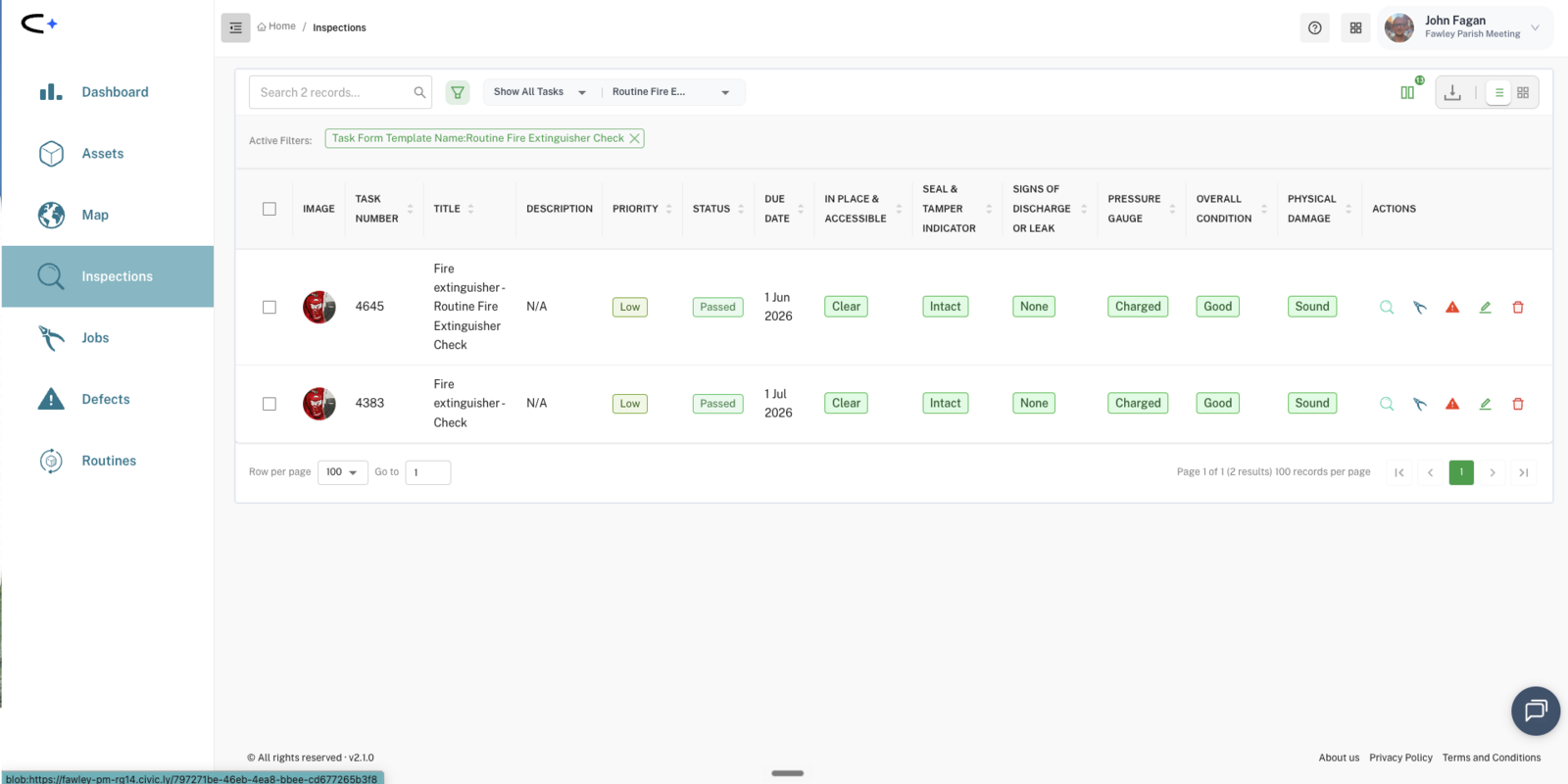
- Filter the inspections list by checklist and each question becomes a column ("Pressure gauge: Charged", "Seal: Intact"), so the filtered view is the report. Download the CSV to hand it to an external assessor.
- You can also give an assessor a direct link to a record, or their own scoped login.
How to choose
Start with one small building and its weekly and monthly checks only. Ignore the annuals until the routine is running, then copy the pattern. If your team is new to the app, a Building Sweep for the first month and then per-checkpoint routines is a reasonable ramp. If an assessor visit is imminent, go straight to per-checkpoint routines for that building.
Common questions
Q: Who should do these checks, grounds staff or office staff? A: Whoever is in the building anyway. The weekly fire-door walk is a five-minute job for a caretaker or venue manager with the mobile app; assign the routine's tasks to them.
Q: What about cleaning schedules? Same approach? A: Cleaning is jobs rather than inspections, but the structure is similar: rooms or facilities as assets where accountability matters, task descriptions carrying the spec, and photo-on-completion where you need proof.
Q: Our fire risk assessment was done by a consultant. Where does it go? A: Schedule its review date as a recurring inspection now. When the report lands, its action items become defects and jobs against the specific assets it mentions.